Microsoft Word Training School
South Africa's most comprehensive Microsoft Word training — master professional document creation from beginner to expert
Microsoft Word training at Real Skills Technical FET is South Africa's most thorough, practical word processing course. Our 6-month programme is fully aligned to SAQA Unit Standard 117924 — a nationally registered qualification covering the use of a GUI-based word processor to format documents at NQF Level 3. You will learn every professional skill required to create, format, edit, manage, and produce high-quality documents using Microsoft Word — from your very first session to your final competency assessment. By graduation, you hold a Certificate of Competence and the practical ability to handle any document task in any professional workplace.
What Is Microsoft Word Training?
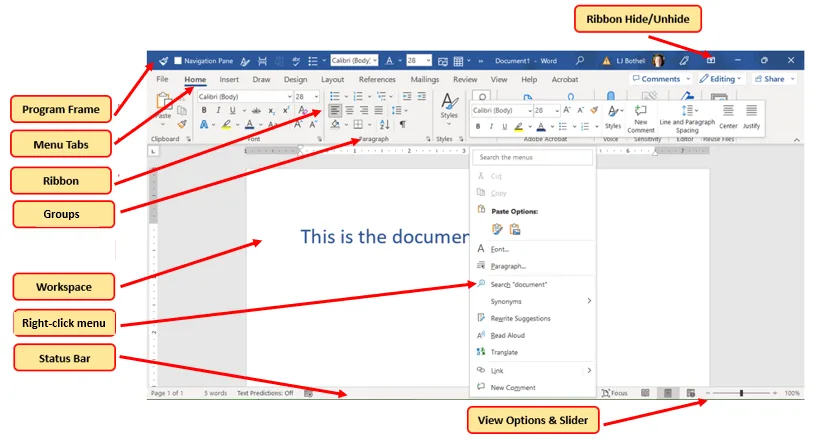
Microsoft Word training teaches you to use Microsoft Word — the world's most widely used word processing application — with full professional proficiency. You learn to create clean, correctly structured documents; apply precise formatting to text, paragraphs, and pages; insert and manage tables, images, and headers; create templates and styles; perform mail merges; and produce final documents that meet the exact standards expected in any South African or international workplace.
Our Microsoft Word training at Real Skills Technical FET is built around the outcomes specified in SAQA US 117924: creating, editing, formatting, and managing documents using a GUI-based word processor. These outcomes map directly to the skills employers across every sector expect from office administrators, secretaries, data capturers, personal assistants, and virtually every other computer-based role. Microsoft Word proficiency is one of the most universally required workplace skills in South Africa.
What You Will Learn to Create & Format
- Professional business documents: Letters, memoranda, reports, proposals, minutes of meetings, curriculum vitaes, cover letters — created to industry standard with correct structure, layout, and professional typography
- Document formatting and styles: Applying and managing paragraph styles, heading hierarchies, font formatting, spacing, indentation, alignment, and consistent visual themes throughout multi-page documents
- Tables, columns, and data layouts: Inserting and formatting tables for invoices, schedules, forms, and reports; multi-column layouts; sorting and calculating data within Word tables
- Headers, footers, and page setup: Page numbering, running headers, section breaks, margins, page orientation, watermarks, and print-ready document setup for professional submission
- Images, shapes, and visual elements: Inserting, resizing, wrapping, and captioning images; adding shapes, SmartArt, and diagrams; creating visually professional documents that meet business presentation standards
- Mail merge and templates: Creating letter templates, performing mail merges for bulk correspondence, managing data sources, and producing personalised documents at scale — a critical skill for administrative roles
- Track changes, comments, and collaboration: Reviewing and accepting document changes, inserting and responding to comments, managing document versions — essential for any office environment
- Document protection and finalisation: Password protection, restricting editing, preparing documents for sharing in PDF and other formats, accessibility settings, and document properties management
📝 Core Microsoft Word Skills You Will Master
6-Month Training Structure — SAQA US 117924
Our Microsoft Word training is delivered across six months, structured into three progressive two-month phases aligned to SAQA US 117924 outcomes. Each phase builds on the previous, taking you from foundational word processing skills all the way through to advanced document management and final competency assessment:
- Microsoft Word interface & navigation
- Creating, saving & opening documents
- Typing, selecting & editing text
- Font formatting — typeface, size, colour, bold, italic
- Paragraph formatting — alignment, spacing, indentation
- Bullet points, numbered lists & outlines
- Page setup — margins, orientation, paper size
- Basic spell check & grammar tools
- Printing & PDF export
- Paragraph styles & heading hierarchies
- Table of contents — automatic generation
- Tables — inserting, formatting & calculating
- Headers, footers & page numbering
- Section breaks & multi-column layouts
- Images, shapes, SmartArt & text wrapping
- Watermarks, borders & document themes
- Find & replace — advanced usage
- Professional business document creation
- Mail merge — letters, labels & envelopes
- Document templates creation & management
- Track changes, comments & document review
- Document protection & restricted editing
- Footnotes, endnotes & cross-references
- Index & bibliography management
- Macros & automation basics
- Accessibility & document properties
- Final competency assessment — SAQA US 117924
Practical, Applied Learning — Real Documents Every Day
Our Microsoft Word training uses a learn-by-doing approach. Every skill taught is immediately applied by creating a real document — a business letter, a formal report, a mail merge, a multi-section proposal. By the end of the 6-month programme, you will have produced dozens of professional-grade Word documents that demonstrate your competency to any employer. Your training output is your portfolio — and employers can see its quality immediately.
Start Your Microsoft Word Training Today
6-month SAQA US 117924 aligned course. Ages 16+. Certificate of competence + job assistance. R12,000 all-in.
Certificate of Competence — SAQA US 117924
On successful completion of your coursework and final competency assessment, we issue you a formal Certificate of Competence aligned to SAQA Unit Standard 117924. This is a nationally registered qualification on South Africa's NQF that employers across every sector recognise as evidence of genuine document formatting skill:
Certificate of Competence
An official Certificate of Competence from Real Skills Technical FET, aligned to SAQA US 117924: Use a GUI-Based Word Processor to Format Documents — NQF Level 3, 4 Credits. This certificate confirms your demonstrated ability to create, format, manage, and produce professional documents using Microsoft Word, and is recognized by employers in administration, business, government, education, legal, healthcare, NGO, and all other sectors across South Africa that rely on office document production.
SAQA US 117924 — NQF Level 3
SAQA Unit Standard 117924 is registered on South Africa's National Qualifications Framework at Level 3 with 4 credits. The standard requires learners to demonstrate competency in: entering and editing text, formatting characters and paragraphs, working with tables, managing page layout and document structure, inserting visual elements, and producing complete, correctly formatted output. Your certificate confirms you have met every specified outcome under qualified assessment.
Who Can Enrol — Entry Requirements
Our Microsoft Word training course is designed to be widely accessible. You do not need a matric certificate or prior Microsoft Word experience. All that is required is basic computer literacy — you should be comfortable using a keyboard, mouse, and operating system — plus your valid ID or passport and the commitment to attend and learn every day for 6 months.
✅ Entry Requirements — Microsoft Word Training
Our Microsoft Word training course welcomes school leavers, job seekers, career changers, office workers seeking formal certification, and anyone who needs a recognised qualification in computer-based document production. If you need to prove your Word skills to an employer with a SAQA-backed certificate, this course is for you.

Why Microsoft Word Training Is One of South Africa's Most Valuable Office Skills
Microsoft Word proficiency is required in virtually every office-based job in South Africa. From the smallest NGO to the largest government department, from a legal firm to a logistics company — if there is a computer on a desk, Microsoft Word is almost certainly part of the daily workflow. A formal, SAQA-backed certificate proving your Word skills gives you a decisive advantage over other candidates in any administrative job application.
Universal Employer Demand
Microsoft Word is the most widely required computer application across all South African industries. Administrators, secretaries, PAs, data capturers, teachers, HR officers, and managers all need it daily in every sector.
Office Administration Gateway
Office administration, reception, and secretarial roles consistently list Microsoft Word proficiency as the primary requirement. A SAQA certificate proves your ability formally and reliably to hiring managers.
Government & Public Sector
National, provincial, and local government departments across South Africa are among the largest employers — and virtually all administrative positions require demonstrated Microsoft Office skills including Word.
Freelance Document Services
Qualified Word users regularly earn income providing CV writing, letter formatting, report typing, and document design services independently — with low overhead and strong hourly rates.
Education & NGO Sector
Schools, universities, colleges, non-profit organisations, and development agencies all require administrators and support staff with strong Word skills for reporting, correspondence, and programme documentation.
Career Foundation & Progression
Microsoft Word training is a foundation for further computer qualifications. Graduates frequently go on to complete Excel, PowerPoint, and full Microsoft Office courses — building a comprehensive digital skills portfolio.
Career Paths After Microsoft Word Training
Our Microsoft Word training graduates enter a wide range of administrative and office-based careers across South Africa's public and private sectors:
Office Administrator
Manage correspondence, reports, filing, and documentation in any business or government setting.
Secretary / PA
Provide executive support through professional document creation, scheduling, and correspondence management.
Data Capturer
Accurately enter, format, and manage data and documents in corporate and government database environments.
Receptionist
Handle front-desk communications, produce correspondence, and manage office document workflows.
CV & Document Writer
Offer freelance CV writing, letter formatting, and document design services to individuals and businesses.
School / NGO Administrator
Support educational institutions and non-profit organisations with report writing, correspondence, and documentation.
Job Assistance Programme
Your support from Real Skills Technical FET continues after you receive your Certificate of Competence. Our dedicated job assistance team actively connects Microsoft Word training graduates with employment opportunities across South Africa:
Employer & Agency Connections
We maintain direct relationships with companies, recruitment agencies, government departments, NGOs, and businesses that regularly hire administratively qualified candidates — including our Microsoft Word graduates.
CV & Document Portfolio
Professional CV preparation that prominently features your SAQA Certificate of Competence, plus coaching on how to present your Word skills and document portfolio to administrative employers effectively.
Job Vacancy Alerts
You're added to our graduate database and receive direct notifications when partner employers post administrative, secretarial, data capture, and office support positions — often before public advertising.
Graduate Network
Connect with Real Skills graduates working in offices, government departments, schools, and businesses across South Africa — sharing job leads, contract opportunities, and practical workplace advice.
Your Microsoft Word Career Starts Here
ID or passport. Age 16+. 6 months of structured, practical training. SAQA Certificate of Competence + job assistance. Everything for R12,000.
Frequently Asked Questions
Everything you need to know about our Microsoft Word training school and SAQA US 117924 course
Microsoft Word training teaches you to use Microsoft Word professionally to create, format, edit, and manage documents. Our SAQA US 117924 aligned course covers text formatting, paragraph styles, tables, headers and footers, mail merge, document templates, track changes, and full document management from beginner level to advanced competency over 6 months of practical training.
No. You do not need a matric or Grade 12 certificate to enrol in Microsoft Word training. The only requirements are a valid South African ID or passport, being 16 years of age or older, and having basic computer literacy — you must be able to use a keyboard, mouse, and basic operating system. No prior Microsoft Word experience is required.
The Microsoft Word training course runs for 6 months full-time (Monday to Friday). It is structured in three two-month phases: Months 1–2 cover foundational word processing and basic formatting, Months 3–4 cover styles, tables, and visual elements, and Months 5–6 cover advanced mail merge, document review, templates, and your final competency assessment aligned to SAQA US 117924.
You receive a Certificate of Competence from Real Skills Technical FET, aligned to SAQA US 117924: Use a GUI-Based Word Processor to Format Documents (NQF Level 3, 4 Credits). This certificate is recognized by employers across all South African business, government, education, legal, and NGO sectors as formal proof of your Microsoft Word proficiency.
The Microsoft Word training course costs R12,000 all-in. This includes all course materials, Microsoft Word software access during training, the 6-month structured curriculum, your SAQA US 117924 competency assessment, Certificate of Competence, and job placement assistance. No hidden costs. Payment plans are available on request.
Microsoft Word training graduates pursue roles including office administrator, secretary, personal assistant, data capturer, receptionist, school administrator, NGO office worker, legal typist, government department administrator, and freelance document services provider. Microsoft Word is required in virtually every computer-based administrative role across all nine South African provinces.
Useful Industry Resources
Key references for Microsoft Word users and office professionals in South Africa
SAQA — South Africa
The South African Qualifications Authority — the official body that registers unit standards on the NQF, including SAQA US 117924 which underpins our Microsoft Word training Certificate of Competence.
Visit WebsiteMicrosoft Word Support
Official Microsoft Word documentation, tutorials, and support resources — the authoritative reference for all Microsoft Word features, keyboard shortcuts, and document formatting techniques.
Visit WebsiteSETA — MICTS
The Media, Information & Communication Technologies SETA — the SETA responsible for ICT and computer skills training accreditation and learnership programmes in South Africa.
Visit WebsiteRelated Vocational Courses
Build a complete skills portfolio with our other digital and trade training programmes



Start Your Microsoft Word Career Today
ID or passport. Age 16+. 6 months of structured, practical training. SAQA-aligned Certificate of Competence and job assistance — everything for R12,000 all-in.